Your first creator search
Run a search, review results, and save a creator in a couple of minutes.
You can start searching the moment you sign up — no account connection required.
Run a search
- Open Instagram Creator Search or TikTok Creator Search from the navigation.
- Add filters — a topic or keyword, follower range, location, and engagement level.
- Review the results grid. Each card shows the creator's handle, follower count, and engagement.
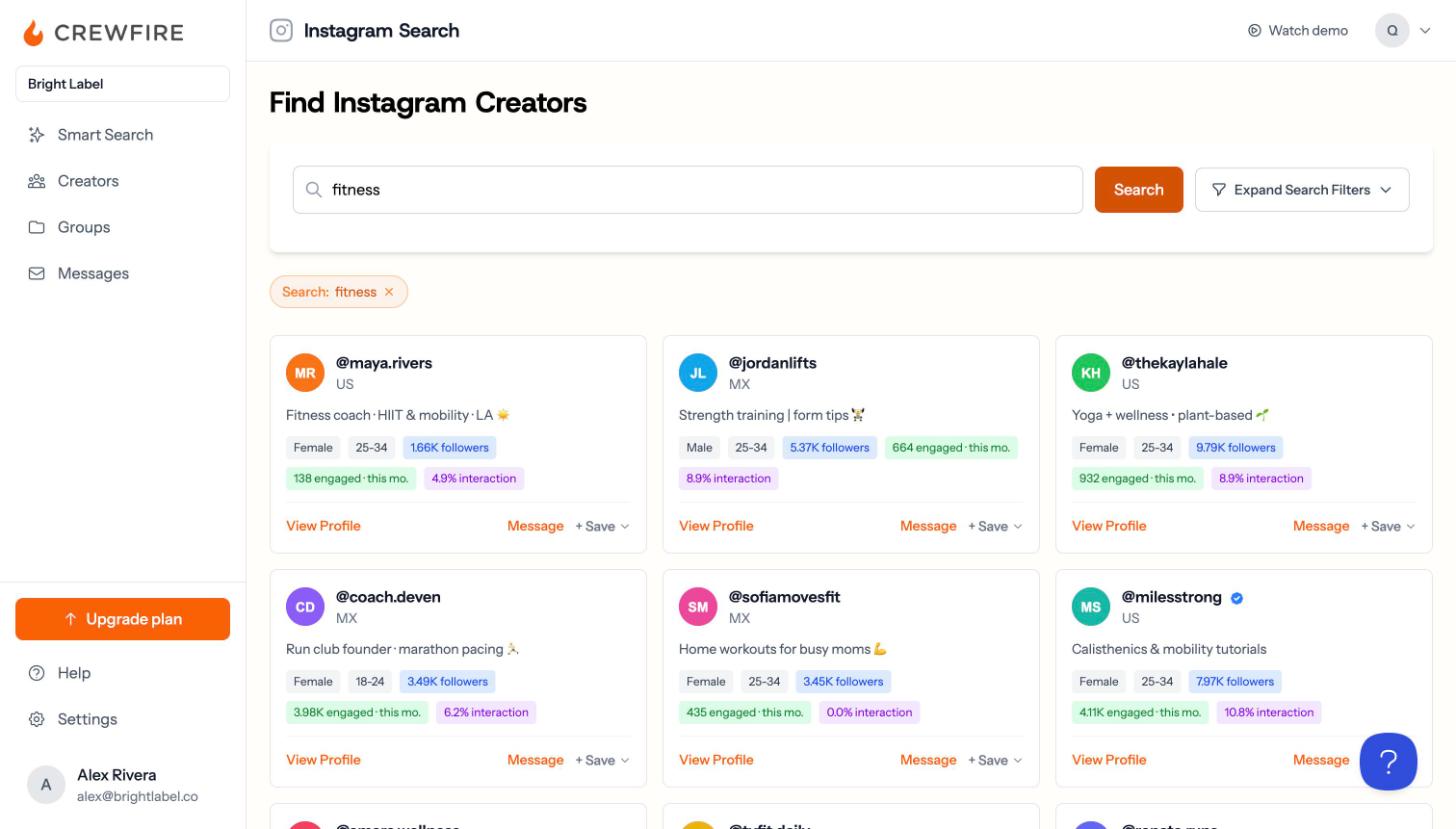
Search results — each card shows the creator's stats, with View Profile, Message, and Save actions.
Prefer to describe who you want? Try Smart Search and type something like "fitness
micro-influencers in the US with high engagement" — CrewFire turns that into a search for you.
Review a creator
Click any creator to open their profile, where you can see more detail about their audience and
recent performance before deciding to save them.
Save a creator
Hit Save on a creator card or profile to add them to your roster. Saved creators appear under
Creators, and you can add them to a group at any time.
A note on search credits
Standard Instagram and TikTok searches don't use credits. Smart Search uses credits because it
runs an AI step to interpret your request. Your current plan's monthly allowance and usage are shown
right in the search screens, so you always know where you stand.
Learn more in Understanding search credits.
More in Getting Started
Still need help?
Can't find what you're looking for? Our team is happy to help.
Or email us directly at support@crewfire.com